
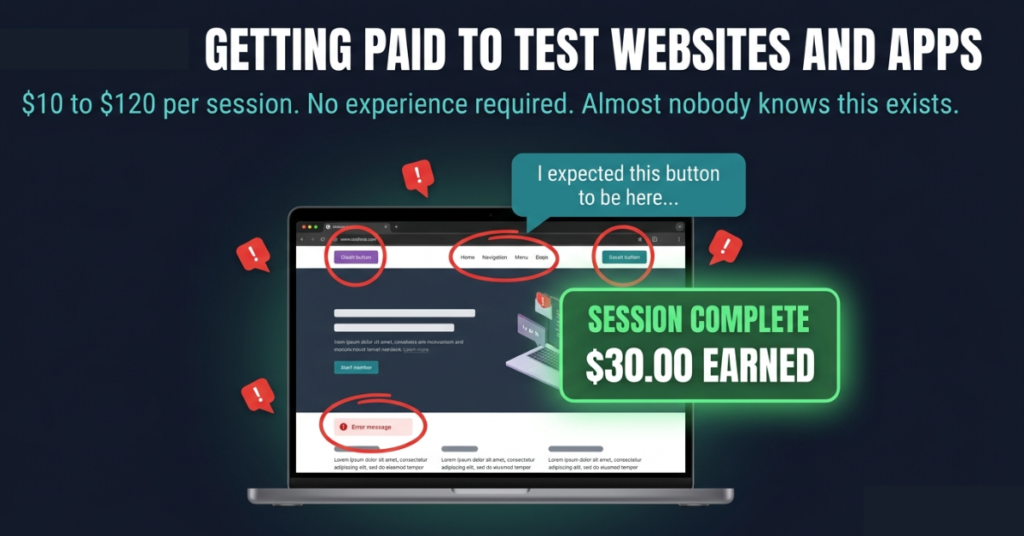
A friend called me while she was in the middle of getting paid to be confused.
She was sitting at her laptop, talking out loud at a bank’s website, narrating every moment of friction she experienced. The login button placement did not make sense to her. She said so. A dropdown menu behaved differently from how she expected. She described exactly why, she spent forty-five minutes on this, including the screener questions at the start and earned $30 when the session was approved a few days later.
She had not been hired as a consultant and she had not applied for a job. She had signed up to a platform called UserTesting, passed a short qualification test and been matched with a study commissioned by a financial services company trying to understand why users were dropping off before completing their onboarding flow. My friend’s confusion was the product the bank was paying to understand it.
I remember thinking the whole thing sounded slightly absurd until she explained the economics from the company’s side. A product team that has spent six months building a user interface cannot evaluate it the way a first-time visitor does. The familiarity that comes from building something is the exact thing that prevents you from seeing what is wrong with it. Paying strangers to encounter it fresh and say what they notice is not a quirky research method. It is one of the few ways companies can access the perspective they have completely lost.
What surprised me more than the $30 was that I had never heard of this. I had spent years researching online income sources. User testing had not come up once in any article I had read. I later found out why, the income ceiling is low enough that it does not make for a compelling headline. Nobody gets rich from this but at $15 to $30 an hour for work that requires no credentials, no prior history and about a week to get started. It is one of the most honest supplemental income options that exists and it is almost entirely under-covered.
The Business Problem That Created This Market
Every digital product team has a version of the same problem and it does not get easier with more experience or better tools.
You spend months building something. You know every corner of it. You know what each button does before you read the label. You know what the error message means before you finish the sentence. When you sit down to test your own product, the knowledge you have accumulated is working against you at every step, because genuine confusion requires not knowing something and you no longer have access to not knowing this.
The solution is importing people who do not know it yet. People who will click the wrong thing because it looks like the right thing. People who will read a menu item three times before realising what it means. People who will attempt a task six different ways before giving up and saying they cannot find it. That behaviour, frustrating and expensive to watch as a product designer, is exactly the data the research team needs.
UserTesting’s average small business client spends $36,265 per year on the platform, according to SpendHound’s analysis of de-identified spend data from over 160 customers in 2026. Enterprise customers spend an average of $147,756. That budget comes from product teams, UX research departments and marketing teams across industries, and a portion of what they spend reaches the testers who complete those sessions.
Two session types dominate the market and they pay very differently.
Unmoderated tests are recorded and asynchronous. You follow a set of instructions, complete tasks on a website or app while talking out loud and submit the recording when done. These take five to twenty minutes and pay $4 to $10 each. Moderated sessions are live, you join a video call with a researcher who guides you through tasks in real time and asks follow-up questions about your reasoning. These pay $30 to $120 depending on length and complexity. A sixty-minute moderated session at $60 per hour competes with entry-level freelance rates in many categories, which is why getting qualified for them consistently is worth pursuing.
Five Platforms, Honestly Compared
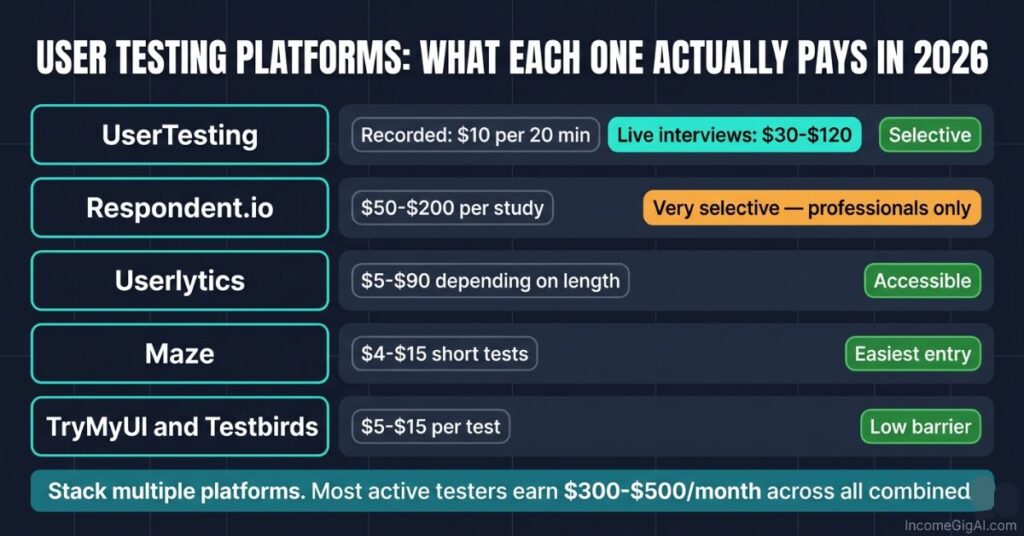
Not every platform that claims to pay for user testing is worth the time to apply. These are the ones with real volume and documented consistent payouts.
UserTesting has the most test volume of any platform and the most established payment system. Standard rate is $10 for a twenty-minute recorded test, with live interview sessions paying $30 to $120. Payment goes to PayPal within seven days of approval. New applicants go through a qualification test and sessions that do not meet quality standards are rejected without payment. The selectivity is a feature rather than a flaw, the platform’s value to clients depends on tester quality and that keeps the standards high enough that approved sessions tend to get paid reliably.
Respondent.io is where the higher hourly rates live. Studies typically pay $50 to $200 per session and recruit specifically for professional backgrounds. Marketing managers, software developers, healthcare workers, financial professionals, small business owners. The screening is strict because the research requires specific expertise rather than general consumer perspective. If your professional background qualifies you, Respondent is consistently the highest-earning option. If it does not, the platform is less accessible than alternatives.
Userlytics sits between the two in both pay and selectivity. Tests pay $5 to $90 depending on session type and length and the variety of studies available tends to be wider than UserTesting. Worth having a profile on alongside the bigger platforms.
Maze focuses on startup and tech company product research. Tests are shorter, typically five to ten minutes, which means lower per-session pay but higher availability and an easier qualification threshold. Better as a volume supplement than a primary platform.
TryMyUI and Testbirds are smaller and pay less individually, but adding profiles on them means more total available sessions each week without adding meaningful management overhead. The setup takes an hour. After that, checking them costs a few minutes daily.
Sitting Through an Actual Session
The first session is always slightly awkward. Talking out loud while navigating a website feels unnatural until it becomes habit, which takes two or three sessions.
For an unmoderated test you receive a link, launch the session through the platform’s browser extension and follow instructions displayed on screen. A typical task might ask you to find a specific product, complete a checkout, navigate to a particular feature or compare two versions of a page. At each step the expectation is that you narrate continuously. Not a summary at the end. A running commentary of what you are looking at, what you assume will happen when you click something and what actually happens.
The narration is where most early sessions fail. When people encounter something confusing they go quiet while they figure it out, which is exactly the moment the researcher most needs to hear what is happening in their head. A session full of silence during confusion produces little usable data and is more likely to be rejected, which means no payment.
The things researchers want to hear are more specific than general impressions. Not this is confusing but I expected this button to take me to my account settings but it opened a completely different menu. Not I do not like the design but the green here looks similar to the blue in the navigation so I initially read them as the same element. Specific observations, not verdicts.
Moderated sessions feel different. You join a video call with a researcher who controls the pace of the session, asks you to complete tasks and pauses to ask what you were thinking at specific moments. It is closer to a guided conversation than a solo test. The preparation required is minimal, arrive on time, have the equipment working and be willing to say honestly what you think rather than what you imagine the company wants to hear. Researchers have been trained to extract useful feedback and they are very good at telling the difference between someone saying what they actually noticed and someone trying to be helpful.
What You Actually Earn
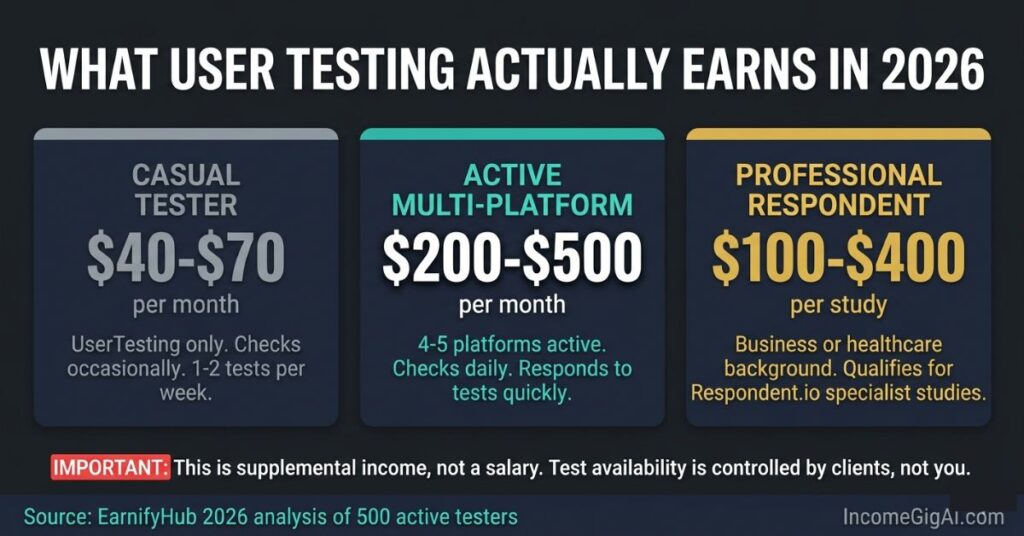
The income ceiling is the thing most user testing content either buries or skips. Being direct about it upfront is more useful than discovering it three months in.
For most active testers on UserTesting alone, consistent use produces $40 to $70 per month. That is from EarnifyHub’s 2026 analysis of data across 500 active testers. Adding Userlytics, Maze and two smaller platforms while checking availability daily pushes the realistic ceiling to $300 to $500 per month for someone qualifying for multiple sessions each week across all platforms.
The ceiling is determined by test availability, which is controlled entirely by how many studies clients commission. You have no leverage over that number. A busy week might bring five or six available tests while a slow week might bring one. During the periods before major product launches or ahead of quarterly planning cycles the volume tends to pick up. During slower periods it drops. There is no way to manufacture tests that do not exist.
The economics look better for people who qualify for Respondent studies. A $100 moderated session that runs ninety minutes including preparation is roughly $67 per hour. Those sessions appear less frequently and require matching a specific professional profile, but for someone with relevant professional credentials they represent an entirely different income tier within the same general activity.
The realistic framing for most people is this: user testing pays better per hour than almost any other low-barrier online income source. It does not pay enough to be a primary income. It is most useful as one component of a diversified supplemental income approach rather than as a standalone strategy.
If user testing is your first foray into online income, this is a realistic and honest starting point for earning your first $100 from a low-barrier online income source.
Getting More Tests and Better-Paid Ones
Two things determine how many available tests you see and how often you qualify for the higher-paying ones.
The first is your quality rating. On UserTesting this rating is based on how researchers evaluate your submitted sessions. High-quality narration, task completion, following instructions carefully and submitting sessions with clean audio and video builds a higher rating over time. A higher rating means more tests are shown to you in the first place and you qualify for more advanced session types.
The fastest way to build a quality rating is not to move faster. It is to narrate more specifically. Say the thing that seems too obvious to say. Describe what you expected before you describe what happened. When something does not work the way you anticipated, explain why your anticipation was wrong rather than just saying it did not work. These habits produce sessions that researchers find genuinely useful even when the product being tested is fairly straightforward.
The second thing is profile completeness. On Respondent particularly, a detailed and accurate professional profile is the mechanism that matches you to the right studies. Researchers designing a study about B2B procurement software need participants who match a specific professional profile. An accurate profile with job title, industry, company size and area of expertise makes you findable for studies you genuinely qualify for. An incomplete profile means being screened out at the invitation stage for studies you would have been eligible to complete.
Running four or five platforms simultaneously rather than one is the other meaningful lever. The setup time for profiles across all platforms is three to four hours. After that the management overhead is checking availability daily and completing sessions when they appear. The additional platforms do not require additional skill. They just increase the total pool of available work.
For other supplemental income models worth combining with testing that operate on a similar low-barrier principle, these options cover different angles of the same income tier.
Things Worth Knowing Before You Start
The geographic reality is worth understanding before spending time on applications. Test volume for the major platforms is significantly higher for testers in the United States, Canada, United Kingdom and Australia than for most other markets. If you are outside those regions, available sessions drop substantially on most platforms and some session types are geographically restricted. Checking each platform’s geographic availability before applying saves time.
Early rejections are normal and do not reflect on the eventual outcome. New testers often go through a frustrating period of submitting sessions and having them rejected before understanding exactly what each platform’s reviewers are looking for. UserTesting provides feedback on rejected sessions, though the feedback is sometimes general enough that it requires a few iterations to fully understand what needs to change. Treating early rejections as calibration rather than failure makes the initial period more navigable.
Income from user testing is taxable. In the US, platforms issue 1099 forms for earnings above $600 in a calendar year. In the UK, income above the personal allowance is taxable regardless of source. Keeping records of session payments from the start and setting aside a portion for tax is significantly easier than reconstructing the records later.
Frequently Asked Questions
How long does it take to pass the UserTesting qualification test?
The sample test itself takes about fifteen to twenty minutes. It mirrors what an actual session looks like: you complete a task on a practice website while narrating your experience. The platform evaluates whether your narration is continuous and specific, whether your audio quality is acceptable and whether you followed the task instructions correctly. Most people who are rejected on the first attempt can reapply after thirty days. The most common reason for initial rejection is inadequate narration during the task rather than technical audio issues.
Can I do this on a phone instead of a laptop?
Depends on the test. Mobile app testing requires a smartphone and the platform’s mobile app. Desktop website testing requires a laptop or desktop with a browser extension installed. Some platforms specify which device types they accept for each study. UserTesting supports both desktop and mobile testing with separate qualification processes for each. Qualifying for both significantly increases the number of available studies you can participate in, since mobile-specific tests are not accessible to testers who have only completed desktop qualification.
What happens to my earnings if a session gets partially completed but something goes wrong?
If a technical problem on the platform’s end causes a session to fail mid-completion, most platforms either allow you to restart the session or credit you for the partial completion. If the failure was on your end, such as a browser crash or connection drop, the outcome depends on the platform and the stage at which the failure occurred. Completing the session from the start is typically required for payment. Contacting support immediately when a technical failure occurs during a session is worth doing rather than waiting to see whether the partial session gets processed.
Is there a limit to how many sessions I can complete in a day?
Not a formal limit in most cases, but available sessions are finite at any given time. On a busy day on UserTesting you might find three or four sessions available that match your profile. Completing them all and checking back later in the day sometimes surfaces additional sessions as new ones are published. The practical ceiling on a high-volume day is usually around five to six sessions across all platforms combined, not because of a rule but because of availability. Some sessions also specify that each tester can only participate in a given study once, which means you will be screened out of studies you have already completed if they re-appear.
Do companies see my name or personal information during sessions?
Platforms handle this differently. UserTesting anonymises tester identities for clients by default: the company receiving your session video sees your recorded session but not your name or personal details. Respondent handles privacy differently because the studies involve direct interaction with researchers, who may see your first name and professional background as described in your profile. Reading each platform’s privacy policy before completing sessions that involve live interaction is worth a few minutes of your time if this is a concern for you.

Johnson Alaekezie is a freelancer and digital content creator with several years of experience working across writing, content strategy, and digital services. He founded IncomeGigAI to share honest, practical information about building income online without the hype that dominates most of this space. Johnson has worked with clients in the US, UK and beyond, and writes from direct experience rather than theory. He is based in Nigeria and covers the digital income topics he has personally navigated as a working freelancer.