
I almost scrolled past it, I would have missed it and it would have been a great loss.
A tweet from someone I vaguely followed. Screenshot of a Gumroad dashboard of $4,200 in sales. The product was a Google Sheet, a budget tracker priced at $12 around 350 buyers. He had posted the link twice and then basically left it alone.
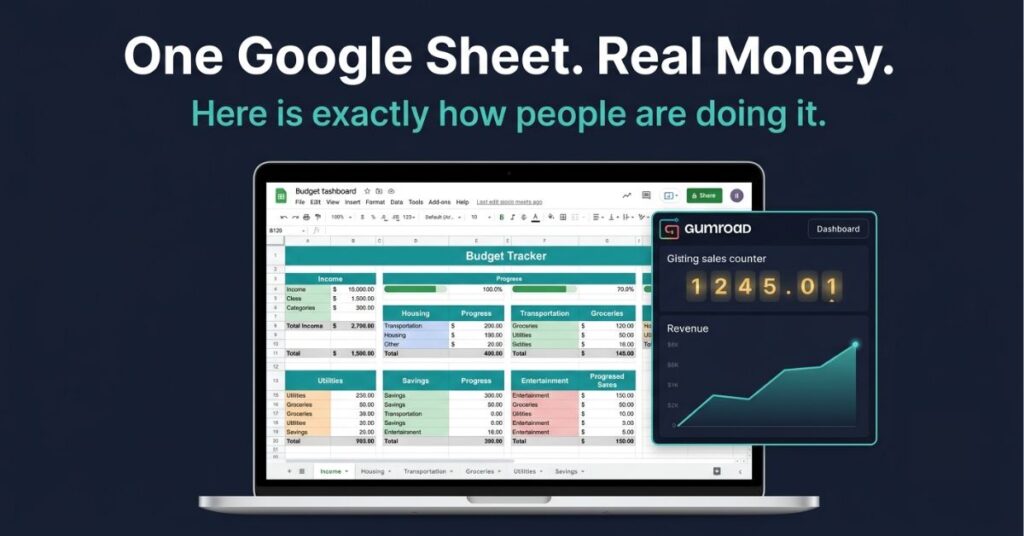
I clicked through expecting something impressive but it was not. Decent formatting, a few dropdown menus, conditional formatting that turned cells red when spending went over budget. Nothing I could not build in a weekend, probably nothing you could not either.
That was about eighteen months ago and I have been watching this space closely since. People building and selling Google Sheets as products, on Gumroad, on Etsy, through newsletters, through their own sites. What I found is that it works more often than you would expect, for more types of people than you would think and the barrier to entry is lower than almost any other digital product I have come across.
Why Sheets and Not Something Else
Excel templates sell, notion templates sell, airtable bases sell as well, all of those have real markets.
Google Sheets has a few advantages that matter specifically for selling to regular people rather than power users.
Everyone already has a Google account no need for software to install, subscription needed to open the file and no Mac versus Windows compatibility headaches. A buyer opens your sheet in their browser and it works. That sounds obvious but it eliminates a whole category of support requests that Excel sellers deal with regularly, such as the formulas are broken, it looks different on my computer, I do not have Excel etc.
Sheets is also free to use, when someone is deciding whether to spend $15 on a budget tracker, knowing they do not need to pay for anything else to open it removes a mental friction point that matters at that price range.
And it is collaborative, as a buyer can share their copy with a partner, a team member, a business co-founder, without any licensing issue. For trackers and planning tools that people use with someone else, that is a genuine selling point worth mentioning in your listing description.
The limitation is just that Google Sheets is less powerful than Excel for complex financial modelling and some advanced formula work. For the products that sell well in this space that rarely matters. Worth knowing before you build something highly technical.
What Sells
I went through Gumroad, Etsy and several creator newsletters looking at what was actually converting. Not what people were listing, what had reviews, sales counts and repeat buyers.
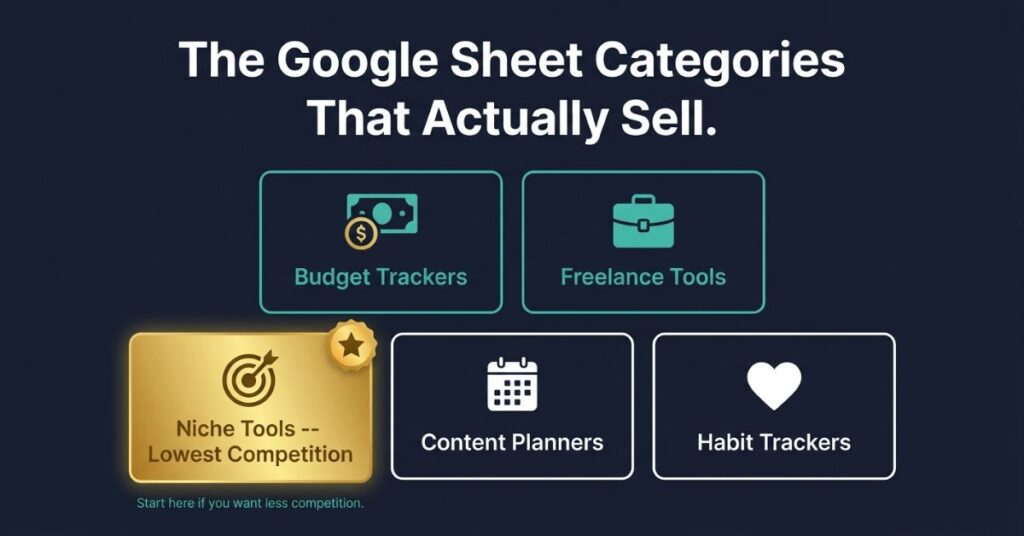
The biggest category by far is personal finance. Monthly budget trackers, debt payoff calculators, savings goal trackers and net worth sheets. The demand is consistent and enormous, people search for this stuff constantly and a meaningful percentage of them will pay for a tool that looks better and works better than something they could build themselves in an afternoon of frustration.
Business and freelance tools are the second major category. Client trackers, invoice trackers, project dashboards, income and expense logs for self-employed people. Freelancers and solopreneurs actively need these and they will pay $20 to $35 for something that saves them an afternoon of spreadsheet building. I have seen client management sheets with hundreds of Gumroad sales at prices that would have surprised me before I started looking at this space seriously.
Content planning comes up consistently too. Editorial calendars, YouTube video trackers, podcast episode planners. Most content creators are not spreadsheet people and a well-designed content calendar, color coded by platform, sortable by status, automatically calculating posting frequency is something a lot of them will happily pay for rather than build.
Health and habit trackers are a slightly different buyer but a consistent one. Workout logs, meal planners, habit trackers. These tend to be simpler to build than business tools. The visual design matters more here because a habit tracker someone actually uses has to look good enough that they want to open it.
The most interesting opportunity and the one with the lowest competition, is niche business tools, rental property income tracker, Etsy seller analytics sheet, wedding budget planner, freelance photographer booking tracker and gym owner’s member management sheet. Anyone searching specifically for one of those has high purchase intent and very few alternatives. Building something specific for a niche you already understand will almost always outperform building a generic tool and hoping it finds an audience.
Pricing
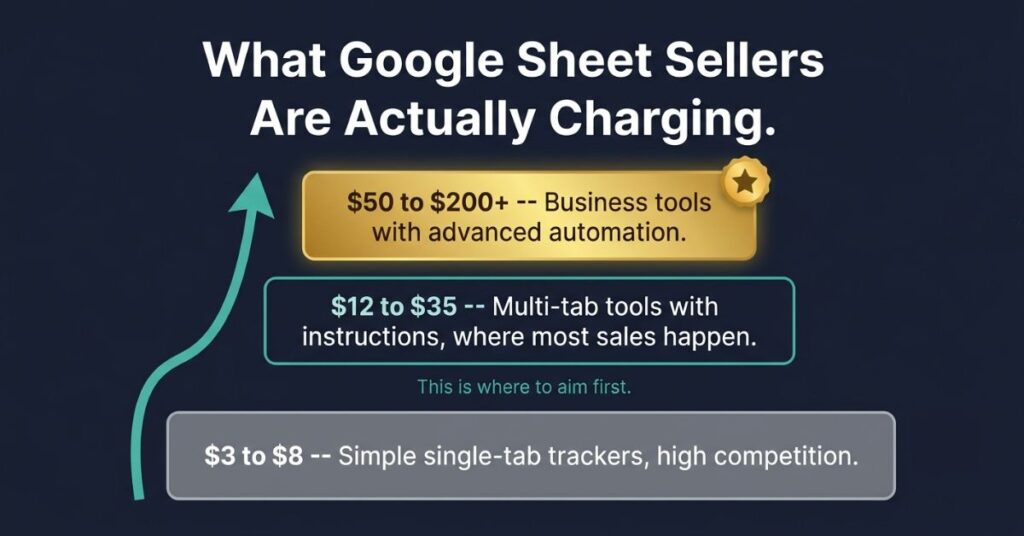
The range in this space is wider than most people expect.
At the low end, $3 to $8 you find single tab sheets with basic formatting on Etsy. Fast to build, fast to buy but competing almost entirely on price. The volume play is harder than it looks because Etsy’s algorithm favors sellers with review history, which takes time.
The mid-range, $12 to $35, is where most of the interesting sales happen. Sheets here are more complex, better designed, and usually come with written instructions or a short video walkthrough. Buyers at this price are making a slightly considered purchase, they have looked at a few options and chosen this one. The conversion depends heavily on how the listing is presented.
At the higher end, $50 to $200 and above, you find multi-tab business tools with advanced formulas, automated calculations, sometimes a video tutorial not impulse purchases. These sell to people with a recurring business problem who have weighed their options. I have seen CRM-style client management sheets, rental property portfolio trackers and agency project management systems selling consistently in this range.
The thing that connects price to product: specificity. A generic budget tracker at $25 competes with dozens of identical-looking listings. A budget tracker specifically for UK freelancers that handles National Insurance contributions, self-assessment deadlines, and quarterly VAT tracking has maybe three competitors and attracts buyers who immediately recognise it is built for them.
What the Good Ones Have in Common
The difference between a sheet that sells and one that does not is rarely about complexity. It is about a handful of specific things.
A clear front page that makes sense immediately. The best-selling sheets open to a dashboard showing the user everything important at a glance total income, total spending, remaining budget, upcoming deadlines. Whatever is relevant to the use case, visible immediately, updating automatically as data is entered. A buyer should open the sheet and know exactly what it does and where to start within thirty seconds.
Colour coding and conditional formatting. Cells turning green when a savings goal is on track, red when spending is over budget. Progress bars filling as goals are met. These visual cues are not complicated to set up but they make the sheet feel like a real product rather than a spreadsheet someone made for themselves.
Instructions inside the sheet. Not a separate PDF. A tab at the front labelled “Start Here” with plain-English instructions for every feature. Some sellers use Google Sheets’ comment feature to add small tooltip notes that appear when a user hovers over a specific cell. This one thing reduces support emails significantly.
Dropdown menus and data validation. Where the user needs to select from a set of options expense categories, project status, client names a dropdown is both cleaner and more useful than a free-text field. It prevents typos from breaking formulas and makes the sheet feel like a finished tool.
Protected formula cells. Locking the cells containing formulas so buyers cannot accidentally overwrite them. The user inputs data in the clearly marked input fields. Everything else is protected and untouchable. This eliminates the single most common complaint: “I broke the formulas.”
Preview Images Do More Work Than the Sheet Itself
On Gumroad and especially on Etsy, the thumbnail and product screenshots are what stop someone scrolling and make them click. A sheet presented with clean, attractive screenshots of the dashboard and key features converts dramatically better than an identical sheet with low-quality or missing screenshots.
I looked at top-selling listings across multiple Etsy categories for this article. The common thread is not the most complex sheet or the most advanced formula work. It is consistently the best-presented listing in the category. The sheet that looks like someone cared about how it was shown to the world.
Spend real time on this. Clean up the sample data so it looks realistic but not cluttered. Screenshot each tab that shows something useful. Use Canva to frame the screenshots cleanly, add text labels and make the listing look deliberate. The goal is for someone scrolling past your listing to stop before they have read a single word.
The Freelance Project Manager Who Made $16,000
She built the sheet for herself, if you do your research very well, that is almost always how the best ones start.
She is a freelance project manager and she could not find a client and project tracker that did exactly what she needed active projects, invoice status, client contact details, deadlines and a dashboard showing which clients owed money and which projects were running late, all in one place. So she built it.
Someone in a freelancer Facebook group asked what tool she used to stay organized. She described the sheet. Three people asked if they could have a copy. She put it on Gumroad on a Friday afternoon, priced it at $27 and tweeted the link to her 800 followers.
First week: twenty sales, $540.
She did not run ads. Did not post about it constantly. Just occasional mentions over the following months when it came up naturally. Over eighteen months it sold over 400 times. A bit over $11,000 from one sheet.
She updated it twice. Once to add a tab for tracking recurring retainer clients. Once to improve the dashboard layout after a buyer suggested something better. Combined those updates took maybe four hours.
Since then she has built two more sheets, a freelance income tax estimator for UK self-employed people and a content calendar and bundled all three for $55. The bundle has brought in around $4,200 additionally. Total across all three products is approaching $16,000. Total time invested she estimates at around sixty hours, spread across eighteen months.
The buyers surprised her not just freelancers like her. Marketing agency owners, solo lawyers, photographers, consultants. Anyone managing clients and projects independently seemed to find the sheet useful regardless of their specific field.
Building It Without Being an Expert
You do not need to be a spreadsheet expert. That is not false modesty, it is just accurate.
The formulas that power the majority of sellable sheets are SUMIF, COUNTIF and IF. SUMIF adds up values that meet a condition, total spending in a specific category, total income from one client. Google’s own documentation explains exactly how to write it with examples.
COUNTIF counts how many entries meet a condition. IF shows one thing or another depending on whether something is true turn the cell green or red depending on the value.
Those three plus basic addition and subtraction cover most of what buyers actually use. Google’s own documentation explains each one clearly. There are YouTube tutorials for every specific use case. If you can describe in plain English what you want the sheet to do you will almost certainly find a tutorial showing exactly how to build it.
Conditional formatting is in the Format menu. Data validation for dropdowns is in the Data menu. Cell protection is in the Tools menu. None of these require formula knowledge. They are point-and-click features most people never explore because they do not know to look for them.
The honest skills floor here is: have you used a spreadsheet before and can you follow a YouTube tutorial? That is enough.
Your First Sales
Getting someone to buy it is harder than building it. That is just the truth.
If building a digital product feels like too big a step right now, another route worth knowing is getting paid directly for expertise you already have. Here are platforms built specifically for that.
The fastest path to first sales is whatever existing audience you have, however small. Five hundred Twitter followers, three hundred newsletter subscribers, an active presence in one online community relevant to the sheet’s topic. Post the link with a clear explanation of what the sheet does and who it is for. A genuine mention to a small relevant audience will almost always beat a generic post somewhere large and unrelated.
No audience yet? Etsy is your best option for organic discovery. Etsy’s annual reports show consistent growth in digital product transactions, which reflects a buyer base that is increasingly comfortable purchasing downloadable tools and templates alongside physical goods. The investment is in the listing itself title, tags, description and especially the preview images. Study the top-selling listings in your category and understand what they are doing with their titles and tags before you write your own.
First five reviews is the Etsy version of the same problem every new seller faces on every platform. Reach out to people in your network who match the target buyer and offer the sheet free in exchange for an honest review. Five genuine reviews moves your listing from essentially invisible in category search to something the algorithm will actually show people.
Niche communities are underused for this. A freelance budget tracker mentioned genuinely and helpfully in a freelancer subreddit or a self-employed Facebook group or a Discord for content creators reaches exactly the right people. The word to hold onto is genuinely communities notice when someone shows up only to drop a link. Being a real participant before you post anything makes the difference between a warm response and being removed.
After One Sheet Sells
Once something is selling consistently the natural move is more variations on the same theme or tools for adjacent problems the same audience has.
Bundles work well in this space. A personal finance bundle; budget tracker, savings goal tracker, debt payoff calculator priced slightly below buying them individually increases average order value and gives buyers who are already convinced a reason to spend more. The project manager I mentioned moved to a bundle and her average transaction value roughly doubled.
Build an email list of buyers from the start even if you do not plan to email them immediately. Gumroad gives you access to customer emails. Every buyer is a warm lead for the next thing you build. Someone who paid $20 for your budget tracker and liked it is much more likely to pay $25 for your savings tracker than a stranger who found you through search.
Seasonal updates give you a reason to reach out. The same principle applies when raising prices on a digital product as when raising freelance rates. The framing and timing matter more than the number itself. A budget tracker updated for a new tax year. A content calendar with new platform categories added. An annual version of a planner. These are light updates that justify an email to your list, generate fresh reviews from existing buyers who re-engage, and occasionally bring people back who had forgotten the product existed.
Protecting the Sheet
Perfect protection does not exist. If someone is determined to copy and redistribute your sheet they will find a way eventually.
What most sellers do, and what works well enough in practice: share the sheet as a template link rather than a direct edit link, Google’s own guide explains exactly how to set this up. When a buyer opens a template link Google Sheets automatically creates a copy in their own Drive. They get their own editable version, cannot touch your original and see other buyers’ copies.
Protect the formula cells using Google Sheets’ built-in protection under Tools. Buyers can enter data and use the sheet fully. They cannot see or modify the formulas underneath. This also prevents accidental breakage, which is the more common problem anyway.
Some sellers add a license tab to the sheet itself personal use only, no redistribution, no resale. Not legally airtight but it establishes clear expectations and filters out the small number of buyers who would otherwise feel confused about what they purchased.
Watermark your preview images with your website or brand name. Image theft someone lifting your screenshots to create a competing listing is a separate but related issue and a watermark makes it obvious where the image came from.
Frequently Asked Questions
I built a sheet that already exists on Etsy. Is there any point listing mine?
Almost certainly yes. Budget trackers, habit trackers and client trackers are categories, not products. Your specific sheet its layout, its features, its design choices, the specific combination of tabs and automations is not the same as someone else’s even if the broad topic is identical. What matters is how well you present what makes yours specifically useful. If your listing description and preview images communicate a clear reason why someone would choose yours, competition in the same category is not fatal. The top sellers in most Etsy digital product categories compete with dozens of similar listings and still sell consistently.
What happens if a buyer says the sheet is broken?
It happens occasionally, the most common cause is that the buyer has typed something into a formula cell and overwritten the formula. Cell protection prevents most of this but some buyers disable protection or find unprotected cells. Keep a clean master copy of the sheet that you never give out. When a support request comes in, send a fresh template link from the master. Most issues resolve that way without needing to diagnose what the buyer actually did. For more complex problems, a five-minute Loom video showing how the relevant feature works usually closes the conversation faster than a written back-and-forth.
Can I use AI to help build the sheet?
Yes and it genuinely helps in specific ways. Describing what you want a formula to do in plain English to ChatGPT or Claude and asking for the Google Sheets formula that does it works consistently well. If you want to go beyond formula writing and see which AI tools are making the biggest practical difference for freelancers right now, we put together a full breakdown of the ones actually worth using.
Asking AI to help you write the instructions tab, the listing description or the product title and tags also saves time. What AI cannot do is make design decisions for you what tabs to include, what the dashboard should show, how the user flow should work. Those decisions require understanding who is buying the sheet and what they actually need. The structural thinking is yours. The formula syntax and the copywriting can be assisted.
Is Gumroad or Etsy better for a first product?
Depends on what you have. Etsy has organic search traffic from buyers actively looking for digital tools, if you optimize your listing well you can get sales without any external promotion. Gumroad has almost no organic discovery but is simpler to set up and has no listing fees. If you have an existing audience you can drive to a product page, Gumroad is fine and costs less per sale. If you are starting with no audience and no promotional plan, Etsy gives you a better shot at organic sales. Many sellers run both simultaneously once the product is built, the marginal effort of listing on a second platform is small.
How long does it take to build a sheet worth selling?
For a simple tracker with one or two tabs, a clear dashboard, dropdown menus and conditional formatting a focused weekend is realistic for most people. A more complex multi-tab business tool with automated calculations and a detailed instructions tab might take two to three weekends depending on how much research and testing you do along the way. The first one always takes longer than you expect because you are figuring out your process as you go. The second one is faster and the third one is faster still. Most of the sellers making consistent income from this have three to six products, not one and they built that catalogue over six to twelve months of occasional weekend work.

Johnson Alaekezie is a freelancer and digital content creator with several years of experience working across writing, content strategy, and digital services. He founded IncomeGigAI to share honest, practical information about building income online without the hype that dominates most of this space. Johnson has worked with clients in the US, UK and beyond, and writes from direct experience rather than theory. He is based in Nigeria and covers the digital income topics he has personally navigated as a working freelancer.