
My friend Tunde edits video for a living. Corporate training content mostly, some YouTube and occasional documentary short. Last year he mentioned almost in passing that he had cut his editing time roughly in half. I assumed he meant he had gotten faster generally, more experienced, better shortcuts.
He meant Descript specifically.
I asked him to show me and he pulled up a thirty minute interview recording, uploaded it and within a few minutes was editing the video by deleting words from the transcript. Cut a rambling two minute tangent in about eight seconds. Removed every filler word in the recording with one click. I sat there watching and thought why is nobody writing about this?
That question sent me down a path of conversations with freelancers across different disciplines. Writers, consultants, researchers, podcast producers and UX researchers. What I was looking for was the tools they were actually using every day, not the ones they had tried once or seen on Twitter. The ones that had genuinely changed how much they could get done.
ChatGPT came up, of course it did. But the tools that kept coming up alongside it and sometimes instead of it were different, specific and built for one job. Unglamorous names that most people outside their user base have barely heard of.
Descript, Otter.ai, Fireflies, Fathom, Castmagic, Notion AI, Loom.
This is what I found out about each of them.
First, Why Not Just Use ChatGPT for Everything
I use ChatGPT and most freelancers I know use it for something. It is genuinely useful as a general writing and thinking tool.
But general purpose tools have a ceiling for specific professional tasks. What Descript does to a video recording, turning the transcript into an editable timeline, identifying speakers, removing filler words in bulk, letting you cut by deleting text while ChatGPT simply cannot do. It is not a version of the same thing but a different category entirely.
The tools in this article are built for one job each. Because they are built for that one job they go deeper than any general tool can. And most of them slot into workflows freelancers already have rather than asking them to change how they work entirely. hat specificity also means you avoid one of the real downsides of leaning too heavily on general AI writing tools. Something worth understanding before you build any workflow around them. A freelance consultant already takes notes in client calls. Fathom or Otter just make that existing habit dramatically more useful.
Descript
When Tunde walked me through his workflow I genuinely did not believe the time saving until I watched it happen in front of me.
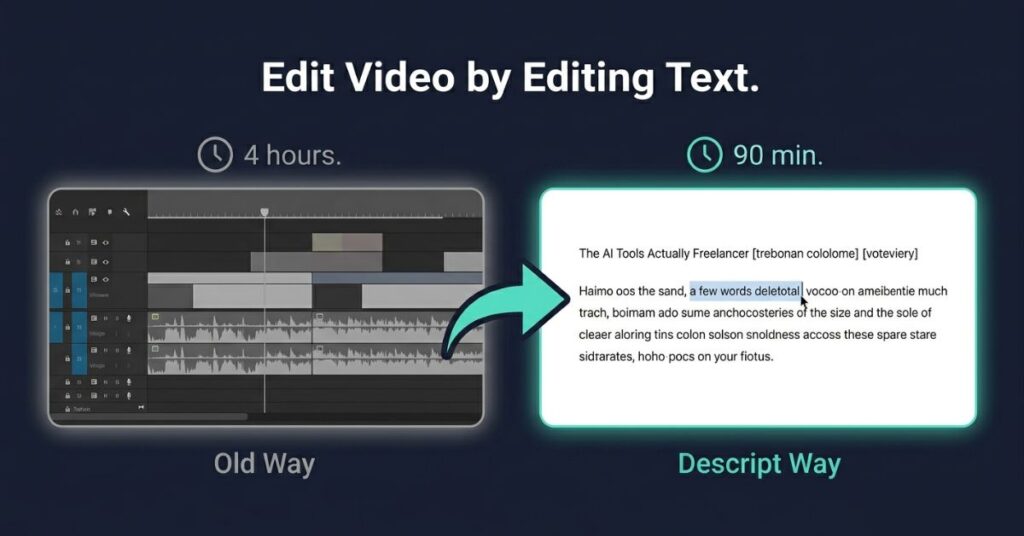
Here is how Descript works. You upload a recording, podcast episode, client interview, YouTube video, course lesson, anything. Descript transcribes it automatically, speaker by speaker. What appears on your screen is not a traditional video timeline with audio waveforms. It is a text document.
You edit the video by editing the text. Want to cut a section where someone rambled? Highlight those sentences, delete them. The video cut happens automatically, perfectly synced. Want to remove every “um”, “uh”, and “you know” from the whole recording? One click. Descript finds them all and removes them from the audio simultaneously.
Tunde goes from raw interview footage to a clean first cut faster than anyone I have seen work in a traditional editor. He told me he used to dread long recordings. Anything over twenty minutes felt like a slog. Now he almost prefers them because the transcript makes the structure obvious in a way that scrubbing through audio never did. He catches things he used to miss like a repeated point, a better answer buried fifteen minutes in that should open the piece.
A freelance course creator I spoke to separately uses Descript for video lessons. Before, editing a thirty minute lesson took her about four hours. Now it takes ninety minutes. She reads through the transcript, deletes what does not belong, and exports directly to the format her client needs. She said the thing she did not expect was how the quality of her judgment improved. Seeing content as text makes structural problems obvious that are easy to miss when you are scrubbing through audio half-asleep at 11pm.
Descript also has an AI voice correction feature that lets you fix small mistakes by typing. You said “in the next section” but meant “in the following chapter” type the correction and Descript generates your voice saying the new phrase, matched to your existing recording and uncanny when it works. Does not always work perfectly on unusual names or very clipped words but for standard corrections it is accurate enough to save real time.
Descript’s feature page has a full breakdown of what the voice correction covers and which plan includes it.
What it costs: Free tier available with limited transcription. Creator plan around $24 per month. Business plan around $40. The Creator plan covers most freelance use cases.
Honest downsides: The learning curve is real, Tunde reckons it took him a solid week before it felt natural. The AI voice correction sounds slightly off on some vocal qualities. And export occasionally requires a format conversion that adds a step. Worth it for anyone doing regular audio or video work. Probably not worth the learning investment for someone who edits once a month.
Otter.ai

Every freelancer who takes client calls has at some point tried to take notes while also listening properly and done both badly. You get halfway through writing a sentence from two minutes ago and miss what the client just said. You catch up on the notes and lose the thread of the conversation. It is a genuinely unpleasant way to work.
Otter.ai joins your Zoom, Google Meet or Teams call, transcribes in real time, identifies speakers, and gives you a searchable record of the conversation within minutes of hanging up. Transcript, AI summary, the ability to search across all past conversations for any word or topic.
A business consultant I know, she does growth strategy for small and medium businesses and make use of Otter on every client call without exception. She stopped taking manual notes almost completely about eight months ago. Her full attention goes to the conversation now. Listening properly, asking the follow-up question that actually matters, thinking about what she is hearing rather than encoding it.
This pattern of AI freeing up human attention rather than replacing human judgment shows up consistently when you look at how small businesses across the US and UK are actually using these tools day to day
Her clients noticed but not because she told them about Otter. One client told her the calls felt different lately, more like a real conversation than a structured interview. She found that funny because nothing about how she runs the calls changed. Just where her attention was going.
She also uses Otter AI Chat, a feature that lets you ask questions across your transcript history. She types something like “what did Marcus say about the seasonality issue in the February call” and gets the relevant section pulled directly. For someone managing eight or ten active client relationships simultaneously, that searchable history is worth the subscription alone.
Where Otter struggles: strong accents, heavy background noise, more than four people talking. Speaker identification is good but not perfect. And the AI summaries, while useful, occasionally miss emphasis or nuance in ways that matter for complex technical conversations. Check the transcript when something feels important rather than relying solely on the summary.
What it costs: Free tier gives 300 transcription minutes per month, enough for light use. Pro plan around $16.99 per month for 1,200 minutes. Most solo freelancers stay on the Pro tier.
Fireflies
Fireflies overlaps with Otter in some ways like transcription, speaker identification, post-call notes but the focus is different. Where Otter is primarily about getting an accurate record of what was said, Fireflies is built around what it calls conversation intelligence. Analyzing the dynamics of the call, not just the content.
After a call, Fireflies gives you a transcript plus a breakdown of topics discussed, action items, questions asked, talk time by speaker and a sentiment read on the conversation. It flags where specific topics appeared in the recording so you can jump straight to the relevant section without scrubbing through.
A freelance sales consultant I spoke to uses the talk time breakdown as a self-coaching tool. After every discovery call he checks the ratio. If he talked more than sixty percent of the time he considers the call poorly run, good discovery is mostly listening. Fireflies gives him that data without estimation. Over about six months of doing this he says his conversion rate on discovery calls has improved meaningfully. He thinks the forced self-review is why.
He also uses the topic detection to check his own process. And has a mental checklist of what needs to come up in every discovery call such as budget, timeline, who makes the decision, what they have already tried. Fireflies shows him where each of those topics appeared in the conversation so he can see at a glance whether anything was missed.
For freelancers whose income depends heavily on the quality of client-facing conversations or anyone in a sales-adjacent role, the conversation intelligence layer is worth more than simple transcription. For freelancers whose calls are primarily project updates and information exchange, Otter is probably enough.
Fireflies also integrates with HubSpot, Salesforce, and several other CRM tools, which makes it more useful if you are running a practice with multiple active clients and want call notes to appear automatically in client records.
What it costs: Free tier available with limited transcription. Pro plan around $18 per month. Business plan around $29. The Pro plan covers most solo use cases.
Honest downside: The sentiment analysis is a blunt instrument. A technical call that uses a lot of negative language to describe problems the client is having gets flagged as negative even when the conversation went well. Use it as a rough signal not a verdict.
Fathom
Of everything in this article, Fathom is the one I have watched freelancers adopt fastest after trying it. The reason is that it does less than the others but the thing it does is close to perfect.
Fathom sits in your Zoom calls and takes structured notes in real time. Not just a transcript actual organized notes by topic, with a highlight button you can click during the call to mark moments that matter. After the call you get a summary, your highlights and a full transcript, all formatted and ready within a couple of minutes of hanging up.
The thing that sets Fathom apart is how fast the output is and how clean the formatting is. The summaries come out ready to share. Several freelancers I spoke to send Fathom summaries to clients after every call as a recap of what was discussed and agreed. Clients love it almost universally. It looks professional, confirms mutual understanding and creates a written record that prevents the “I thought we agreed” conversations that cause scope creep.
A US researcher I spoke to conducts user interviews for clients, typically six to eight per project. She used to spend an hour after each interview writing up her notes while the details were still fresh but Fathom does that for her now. She reads the summary, adds her analytical observations, and has a complete interview record in about fifteen minutes. Six interviews per project, she estimates she saves around five hours of writing time per project. That is a significant chunk.
The free tier is genuinely functional for solo freelancers without payment. Paid plans add team features, more integrations, higher storage.
What it costs: Free tier is sufficient for most solo freelancers. Pro plan around $19 per month.
Honest downside: Zoom-first. Works less smoothly on Google Meet and Teams. The real time highlight button is great but requires remembering to click during the call, which takes a few sessions to become habit. And because it does less analysis than Fireflies, it is not the right tool if you want call intelligence beyond notes and summaries.
Castmagic
Most freelancers have not heard of Castmagic. It worth changing that because it work like a magic.
It is built for one specific workflow: turning long-form audio or video into multiple pieces of written content automatically. You upload a podcast episode, a recorded webinar, a long YouTube video, a client interview. Castmagic transcribes it and generates a suite of outputs from that single recording, show notes, blog post summary, social media posts, key quotes, email newsletter section and chapter headings with timestamps. All from one upload, all in one go.
A freelance content strategist I spoke to manages podcast content for three clients. Each week she takes the new episode, runs it through Castmagic and has a complete set of repurposed content to review and edit within about thirty minutes. Before Castmagic that same deliverable took her a full day per client per week.
She edits everything before it goes to the client. The blog summaries sometimes run long. The social posts occasionally miss a specific client’s tone. But starting from a Castmagic output and editing down is dramatically faster than starting from a transcript and writing from zero.
Castmagic is particularly relevant for freelancers who offer content repurposing as a service. The ability to turn one recorded hour into eight or ten content pieces is a compelling service offering and Castmagic makes it deliverable at a price point clients will actually pay.
What it costs: Starter plan around $39 per month. Pro around $99. More expensive than the other tools here but the right use case justifies it quickly. Wrong use case, it is expensive for what you get.
Notion AI
A lot of freelancers already use Notion. If you are one of them and you have not turned on Notion AI, that is probably the fastest ten dollars a month you could spend right now.
Notion AI lives inside your existing Notion workspace and works on your own content. You can ask it to summarize a long document, generate a first draft of a project brief from bullet points, find information across your workspace without manual searching, translate content or fix grammar and structure across a whole page.
The reason this is more useful than a general AI tool for the same tasks is context. You are not asking a general AI about general things. You are working with an AI that has access to your actual client notes, project briefs, research documents, templates, and past work. The answers it gives are grounded in what you have actually written and stored.
A brand strategist I know keeps all her client work in Notion. Starting a new project in a familiar industry, she asks Notion AI to pull together everything relevant from her existing workspace previous positioning work in similar sectors, frameworks she has developed, relevant research notes. What used to be an hour of manual searching and compiling takes five minutes.
She also uses it to write first draft sections of deliverables from her research notes. She takes rough notes throughout a project without worrying about structure or language. At deliverable time, she asks Notion AI to turn those notes into a first draft of the relevant section. Needs editing, always. But it has the right information and a usable structure, and she can spend her time on the thinking rather than the transcription of notes into prose.
What it costs: Around $10 per month per user added onto existing Notion plans. If you already pay for Notion, this is the easiest addition in this article.
Loom
Loom is old enough that most freelancers know what it is. Record your screen, your face, or both, share via link, done. The AI features added in the past year make it worth reconsidering if you have not used it recently.
When you finish a Loom recording, the AI automatically generates a title, a summary, and a list of next steps mentioned in the video. Record a walkthrough of client feedback, a project update and a tutorial you will get a written summary without doing anything extra.
For freelancers on the receiving end of Loom videos from clients, which is increasingly common, the transcription and summary mean you can read what a client said rather than watching the whole video. Get the summary first, watch only the sections that need clarification. Small time saving but a consistent one.
The deeper value is Loom as a communication tool replacing long written explanations. A two minute Loom showing a client something on screen while you narrate is almost always clearer than a five paragraph email describing the same thing. And faster to produce. The AI summary that comes with it means the client gets a text record too, without you writing one separately.
What it costs: Free tier allows up to 25 videos with a five minute limit each. Business plan around $15 per month for unlimited videos and longer recordings. Most freelancers start free and upgrade when the five minute limit becomes the constraint.
Using Several of These Together
The freelancers getting the most out of these tools are not using them separately. They have built small connected workflows where the output of one feeds into the next.
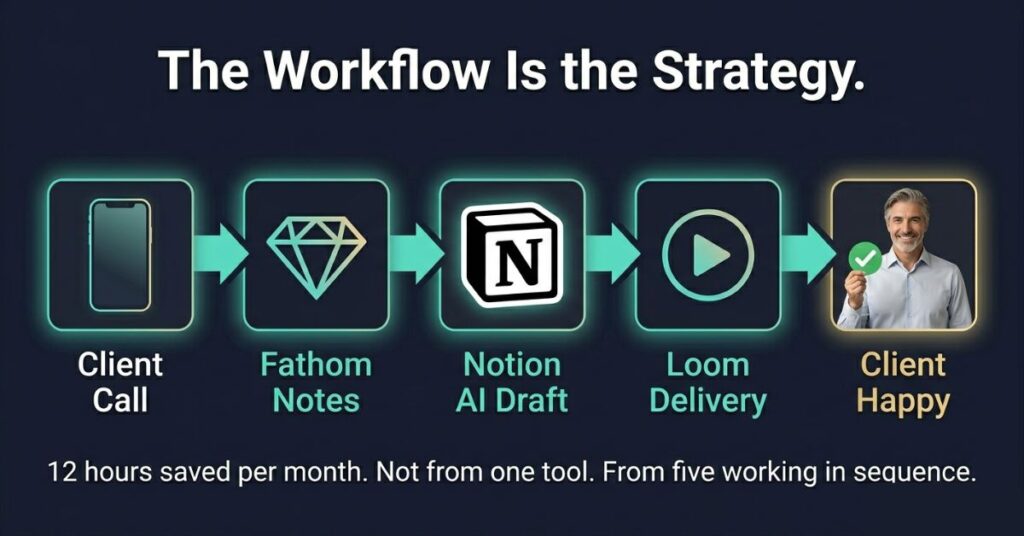
One strategy consultant I spoke to described her current setup. Every client call goes through Fathom. Clean summary and transcript within minutes of hanging up. She pastes the key points into her client workspace in Notion. When she is preparing a deliverable, Notion AI helps her pull relevant information from across her notes and draft a structure. She records her deliverable walkthrough as a Loom for the client, who gets both the video and the AI generated text summary.
Two weeks to set up properly. She estimates it saves her around twelve hours a month. If you want to see what a fully AI-integrated freelance workflow looks like sustained over a longer period, we ran a thirty-day experiment on exactly that. Not from any single tool. From the tools running in sequence, each one handing off to the next.
The individual time savings here are real but modest. A few minutes on a call summary, an hour on a video edit, twenty minutes on a content repurpose. Stack several of those across a full working week and the number gets significant. That is where the “double your output” in the title of this article actually comes from. Not only one tool, he compound effect of several small ones working together.
Real Limitations Worth Knowing
Transcription accuracy is not perfect. Every tool here relies on it at some point. Strong accents, background noise, overlapping speakers, technical vocabulary, unusual proper nouns — all of these reduce accuracy in ways that matter. For anything going to a client, verify the transcript rather than treating it as ground truth. I have seen Otter mishear a client’s company name in a way that would have been embarrassing in a deliverable. Easily caught on a quick read. Not caught if you trust the AI output blindly.
Summaries lose nuance. Things said hesitantly, the thing the client mentioned and then quickly moved past, the subtext in how something was framed. None of that survives compression into a three paragraph summary. For complex client relationships your judgment needs to sit on top of what the AI gives you not be replaced by it.
Cost adds up. Running three or four of these simultaneously is a real monthly expense. The calculation is always whether the time saved is worth the subscription. For most active freelancers with regular client work, the answer is yes fairly quickly. For someone doing occasional project work, probably not.
They need consistent use to deliver value. Fathom does nothing if you forget to open it before the call. Castmagic needs recordings to exist. Notion AI is only as useful as the notes you have been putting into Notion for it to work with. These tools make good habits more productive. They do not manufacture the habits themselves.
Which One to Start With
If you do regular client calls, start with Fathom. Free tier, lowest learning curve, fastest visible payoff. Use it on every call for a week and you will know whether it belongs in your workflow permanently.
If you edit audio or video, try Descript. Give it a full week of real use before judging it. The first few sessions feel unfamiliar. By day five or six most people I have spoken to were already faster than they were in their previous editor.
If you are a consultant or coach and the quality of your discovery conversations directly affects your income, Fireflies over Otter. The self-coaching angle alone is worth it.
If you already use Notion, turn on Notion AI this week. Ten dollars, no new tool to learn, works on content you have already created.
Do not try all of them at once, pick one and use it properly for three or four weeks. Then decide whether to add another. The freelancers getting the most from this category of tools are not the ones who signed up for everything. They are the ones who integrated one thing properly and built from there.
Frequently Asked Questions
I record client calls. Do I legally need their consent?
Yes in most cases and the specifics depend on where you and your client are located. In the US, some states require only one party to consent to a recording, meaning you can record without telling the other person. Other states require all parties to consent. In the UK, recording without informing participants can raise issues under data protection law. The safe and professional approach is to mention at the start of every call that you use an AI note-taking tool. In practice almost no client objects. Several will ask which tool you use because they want it themselves.
Which of these tools is easiest if I am not comfortable with new software?
Fathom and Loom are the most accessible by a clear margin. Both have interfaces most people are comfortable with in the first session without any tutorial. Otter is close behind. Descript has the steepest learning curve of any tool here, it works differently from any other editor and takes real time to internalize. Castmagic and Notion AI assume you already use their base platforms. None of these require technical knowledge in the developer sense. They are built for working professionals.
My clients send me Loom videos with feedback. Is there a way to deal with those faster?
Yes, and this is one of Loom’s most underrated features for freelancers on the receiving end. Every Loom now comes with an AI-generated transcript and summary. Instead of watching a ten minute feedback video in real time, open the summary first, get the overview, then jump to the specific timestamps for anything that needs closer attention. If your client does not already send Loom summaries automatically ask them to, as it is a setting in their Loom account. This alone can save meaningful time if you handle a high volume of client feedback rounds.
Can Castmagic handle video content or only audio?
It can handle both. Castmagic works on uploaded audio files, video files, and YouTube links. The transcription and content generation works the same way regardless of format. For freelancers who manage both podcast and video content for clients, this means one tool handles both workflows rather than needing separate solutions. The output quality is similar across formats the limiting factor is transcript accuracy, which depends on the audio quality of the original recording rather than the format.
I work with clients in different time zones and my calls happen at irregular hours. Do any of these tools have scheduling or a sync limitations?
None of them, Fathom and Otter generate summaries after the call finishes regardless of when it happened you can review them the next morning. Loom is specifically designed for async communication across time zones, which is part of why it has grown so fast in distributed teams. Castmagic and Descript work on uploaded files with no time dependency at all. The only tool with any timing consideration is Fireflies, which needs to be invited to the call in advance to join as a participant rather than being added last minute though you can set it to join all calls automatically to avoid that issue.

Johnson Alaekezie is a freelancer and digital content creator with several years of experience working across writing, content strategy, and digital services. He founded IncomeGigAI to share honest, practical information about building income online without the hype that dominates most of this space. Johnson has worked with clients in the US, UK and beyond, and writes from direct experience rather than theory. He is based in Nigeria and covers the digital income topics he has personally navigated as a working freelancer.