
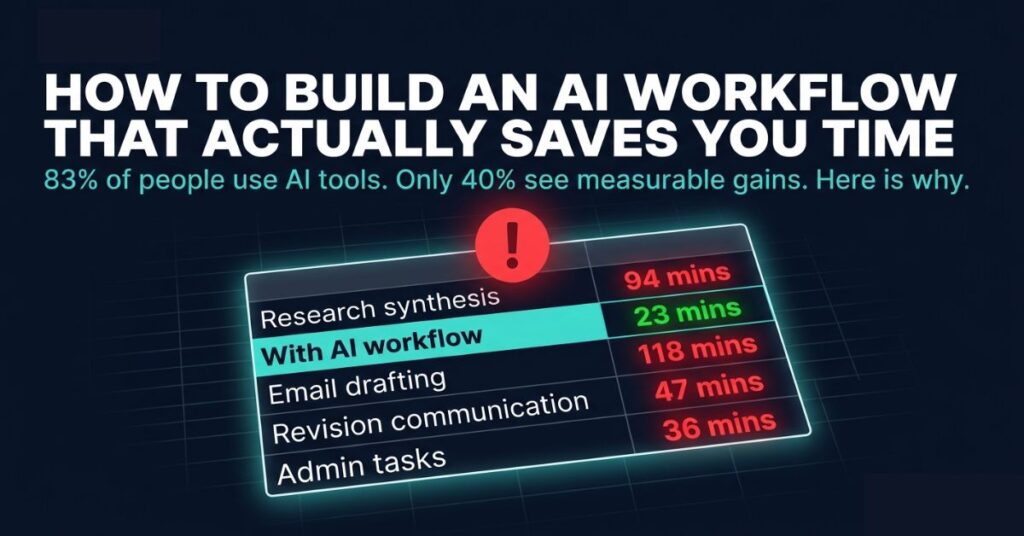
The thing that changed how I use AI tools was not a new tool. It was a spreadsheet I made one afternoon because I was convinced I was working harder than I needed to be.
I started logging every task I worked on for a week, specifically how long each part of each task actually took. Not the project as a whole but the individual steps inside it, research before writing. First draft, revision communication with clients. Email, Administrative work I usually did not think of as work at all because it happened in small scattered pieces throughout the day.
The results were genuinely uncomfortable.
Research and synthesis before writing an article was consistently consuming between ninety minutes and two hours every time. I had not realized because it blended into working on the article in my head. Email was taking close to two hours a day when I added up all the sessions. Revision communication, the back and forth where a client said something vague and I had to figure out what they actually wanted, was eating entire afternoons on the weeks it happened.
I had been using AI tools for almost a year by then. Claude when I remembered it existed. ChatGPT when I got stuck on something specific. I thought this was productive AI use but the spreadsheet disagreed. The tools were sitting in browser bookmarks while the actual time costs of my work ran untouched in the background.
If you are interested in how AI fits into online income specifically rather than just productivity, this guide covers the realistic income applications without the hype.
That week of data is why I now think the question most people are asking about AI tools is the wrong one. Which tool should I use is not the problem. Where in my actual work does time disappear is the problem. And the answer to that question, which requires looking at real time rather than estimated time, points directly at where an AI workflow will and will not help.
The gap between people getting real productivity gains from AI and people who are not is not about which tools they have access to. A 2025 NBER and Microsoft study found knowledge workers saved an average of 3.6 hours per week just on email using generative AI. Harvard Business School researchers found 25.1% speed gains alongside quality improvements exceeding 40%. But 83% of organizations are using AI tools and only 40% report measurable productivity gains. Same tools but very different results. The difference is almost always whether there is a workflow around the tools or just the tools themselves.
How To Make Your Workflows work For You.
Everyone has workflows even if they do not call them that. You have a specific way you approach email in the morning. A pattern for how you prepare before a client call. A sequence, however loose, for how a project moves from brief to delivery. These patterns formed through repetition rather than design. They work well enough that you stopped questioning them, which is not the same as them being as good as they could be.
An AI workflow inserts AI at specific points inside an existing sequence not replacing it or redesigning everything. Just placing the right tool at the right step in a process you already follow, so the mechanical parts of that step happen faster or better than they did when you were doing them manually.
The mistake I made for those first three months of AI tool ownership was never doing this. I had five browser tabs with AI tools. I opened whichever one I remembered when I felt like I needed help. There was no consistent entry point, no standard prompt structure, no sense of which tool was for which type of task. I was getting occasional helpful moments not compounding efficiency.
The setup that changed this was not complicated. I went back to the spreadsheet data and found the three tasks consuming the most time that did not require my judgment to complete. Designed a simple process for each one and I was stuck to the process for thirty days. At the end of the first month, the time those three tasks took had dropped by roughly forty percent. By the time I reached the third month the process felt automatic.
That is the whole concept. Find the tasks where time disappears and identify the mechanical parts. Build a simple process around them. The specific tools matter less than the presence of a process at all.
How to Actually Find Where AI Helps
This is the step almost every guide about AI workflows skips because it requires doing something before using any AI at all.
Spend one week writing down, briefly and informally, what you are doing each time you notice more than thirty minutes has passed. Not a formal time tracking system but just a quick note and at the end of the week you have a list.
Look at each item on the list and ask one question: is this taking time because it requires my specific judgment or is it taking time because it involves volume, repetition or synthesis?
The second category is where AI creates leverage. Not because AI is better than you at those tasks in some absolute sense, but because those tasks do not need what makes you specifically valuable. They just need to get done, and AI can get them done faster.
For content work the high-volume steps are almost always research synthesis and structural outlining. For client service work it is usually communication drafting and report generation. For developers it tends to be scaffolding and boilerplate code. For anyone with a heavy email load it is the sheer quantity of text requiring a response.
What is worth noticing in your own audit is where the time costs are hiding. Mine were in research, email and revision communication. A colleague who does similar work found hers in meeting preparation and follow-up documentation. Same type of work, different friction points, different place to start. The audit tells you where your specific workflow needs help, which matters more than any general advice about which tasks AI is good at.
Opening a Tab Versus Having a System
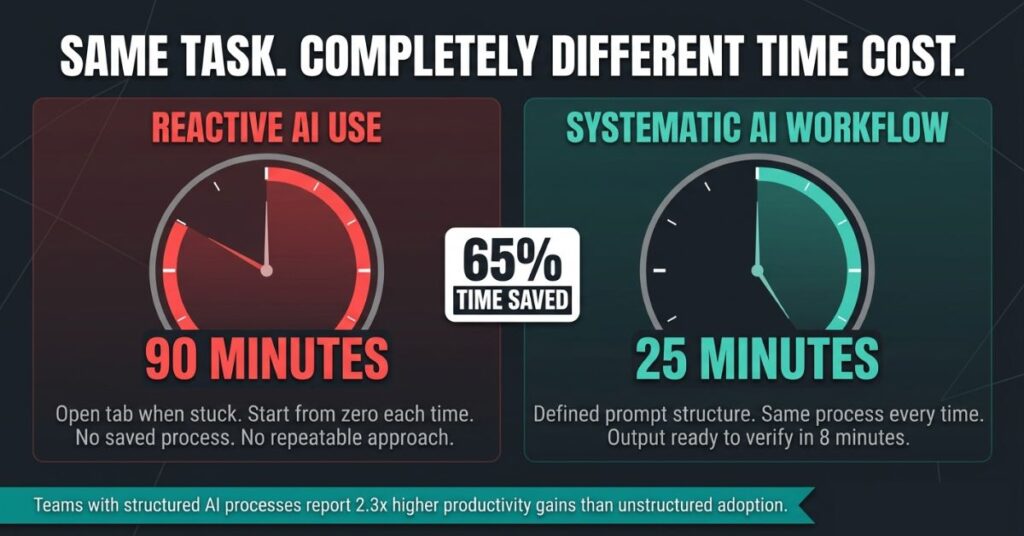
There is a version of AI use that feels productive but does not compound. You are working, get stuck, open an AI tab, get something useful and close it. Three days later the same situation occurs and you start from zero again. No process, no saved prompts, no established approach that makes the second time faster than the first.
I did this for months, although the help was real but the efficiency was not. Each session was essentially a first session because nothing carried over.
The contrast is a defined process for recurring situations and not a complicated system. Just a documented approach that you follow consistently rather than reinventing each time.
Research synthesis before writing, in my current workflow, works like this. I collect sources the same way I always have. Then I paste key passages into Claude with a prompt structure I refined over about six weeks that asks it to synthesise the information, identify the central points and flag any contradictions between sources. I get a synthesis in eight minutes. I read and verify it in fifteen. Then I write from that synthesis rather than from a collection of browser tabs I am trying to hold simultaneously in my head.
That process went from ninety minutes to roughly twenty-five. The change was not using Claude. It was using Claude the same way, with the same prompt structure, every single time. The repeatability is what converts occasional usefulness into consistent efficiency.
Teams with structured AI training and defined processes report 2.3 times higher productivity gains than teams that give everyone access to tools and leave them to figure it out. The numbers are from a workplace context but the logic holds at the individual level. Structure compounds. Random use produces occasional wins that do not build on each other.
Where to Start If You Have Never Done This Before
Pick one task, not three not a whole new system. One task that you do at least twice a week, that takes longer than it should and where you can identify a specific step inside it that is mechanical rather than judgment-based.
For most people reading this, a useful starting point is one of four things: research before writing, email drafting, meeting preparation notes or first-draft generation for a recurring type of document.
Take email drafting as a concrete example because it is the most universally relevant.
Most email responses above a certain length involve the same underlying cognitive moves: understanding what the person is asking, deciding what your answer is, finding the right tone for the relationship and writing clearly. The first and third of those require your judgment. The second you already know. The fourth is the mechanical part: translating a decision you have already made into clear written language at an appropriate length.
A saved prompt for email responses might look something like: I need to respond to the following email. My answer is (A). The relationship is (professional, client I have worked with for six months, friendly but formal). Write a draft response that communicates my answer clearly in the appropriate tone. Keep it under (150) words. That prompt, refined over a few weeks of actual use, turns a twelve minutes email into a three minutes one, because the drafting is handled and the editing is quick.
For a more critical look at AI writing tools specifically and what they cost your voice over time when used without a defined workflow, this article covers the problem honestly.
The first version of this will not be perfect. The prompt will need refinement, that is expected and not a problem. The point of starting with one task is that you can iterate quickly without disrupting your whole workday while you figure out what works.
Making the Tools Work Together
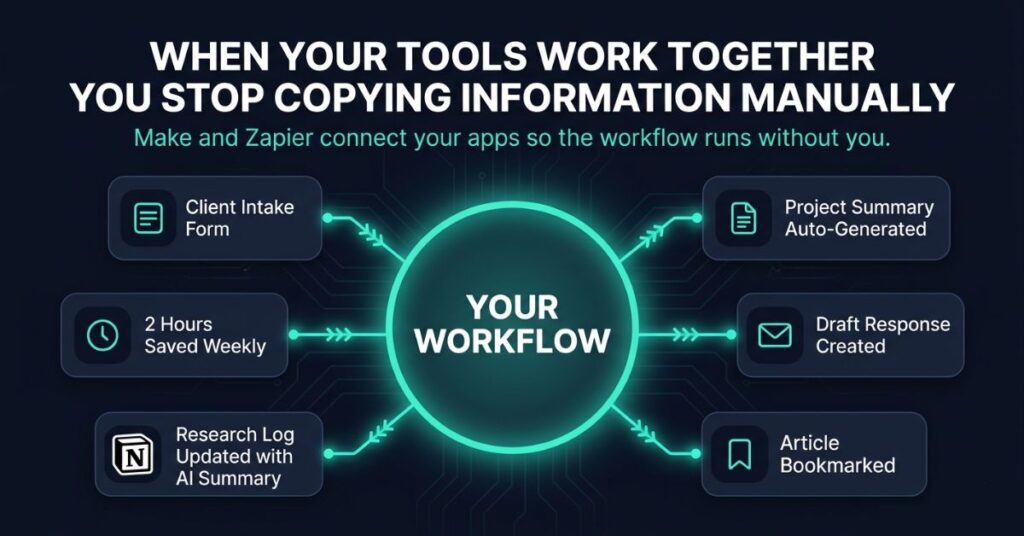
Before building the workflow, getting the underlying approach to AI right matters. Using ChatGPT as a thinking partner rather than a vending machine produces better inputs for any workflow built around it. Individual AI use is useful. Tools connected to each other so, information flows between them without you manually copying it, is where time savings start to compound beyond what any single tool produces alone.
Make and Zapier are the platforms that make this possible without writing code. They work by connecting the apps already in your workflow to each other and to AI tools so, specific triggers cause specific things to happen automatically.
My intake form for new client projects, when submitted, now automatically creates a structured project summary in my project management tool and drafts a first response email. Both need my review before anything goes out. But the initial drafting and the information organisation happen without my involvement. That used to take about twenty-five minutes of manual copying and initial drafting. Now it takes five minutes of reviewing and editing.
My reading workflow, separately, automatically adds any article I bookmark to a research log in Notion with an AI-generated summary of the key points. When I am researching something I can search that log first. I find relevant material I would otherwise have forgotten I had read, without re-reading anything from scratch.
Neither of these took more than an hour to set up. Together they recover around two hours per week that was previously going to mechanical tasks with no judgment component.
The question worth asking about your own setup: where do you regularly copy the same information from one place to another? Where do you do the same preparatory step before multiple different tasks? Both of those are candidates for automation and the automation usually takes less time to build than the task takes to do three times manually.
Three Ways People Build Workflows That Do Not Work
The first is adding tools before confirming that one tool is helping. Five AI subscriptions, used occasionally across different tasks, produces five sources of occasional usefulness rather than one reliable efficiency gain. Start with one tool on one task, confirm it is actually saving time not just feeling productive. Then add the next element.
The second is automating steps that require judgment. AI handles volume and mechanical synthesis well. It handles knowing your client, reading the mood of a relationship or making a decision that depends on context it does not have poorly. When people build workflows that hand judgment-heavy steps to AI they end up reviewing and correcting output that was never going to be right, which usually takes longer than doing it manually in the first place.
The third is building the workflow once and assuming it is done. The first version of any workflow is a draft. Some steps will produce output that consistently needs significant editing. Those steps need different prompts, different tools or a different approach. A workflow that gets looked at every month and adjusted where it is not working improves continuously. One left alone gradually drifts out of alignment with how your work actually runs.
What the First Six Months Actually Look Like
Month one is slower than expected. Setup time, prompt refinement, building the habit of using the process rather than reverting to the old approach. Time savings are real but modest. This is the phase where most people conclude that AI workflows are not worth the effort, which is a reasonable conclusion to draw from month one data applied to the wrong timeframe.
Month three is where the process feels natural and the gains become consistent. The workflow runs without effort because it has become the default way the task gets done rather than an alternative you have to remember to use.
Month six is where the reallocation of recovered time becomes meaningful. The two hours per week freed up from email drafting, or the hour per week freed up from research synthesis, is now reliably available for something else. Over a year that is 100 to 350 hours depending on which tasks were redesigned and how specifically the workflow was built around the actual friction points.
The Harvard and NBER data showing 25% speed gains and 3.6 hours saved on email are real averages from real people. They are also averages. The people at the high end of those ranges redesigned the highest-leverage steps in their specific work. The people at the low end built workflows around tasks that were not their actual bottlenecks. Your time audit tells you which category you are starting from.
Frequently Asked Questions
What if I build a workflow and then the AI tool I am using changes or gets worse?
This happens and it is worth building for it. The workflows most resilient to tool changes are the ones where the prompt structure is documented separately from the tool. If your research synthesis process is a saved prompt that lives in a document rather than just in one tool’s interface, switching tools means pasting the prompt into a new interface rather than rebuilding the process from scratch. Save your best prompts in a document you own. The tools will change. Your prompts are the asset.
How do I get my clients or team to use the workflow I build rather than reverting to the old process?
For client-facing workflows, the client does not usually need to interact with the AI part at all. The workflow happens on your side. The client sees the output: faster turnaround, clearer documentation, better-structured communication. They do not need to know or care about the process that produced it. For team workflows, the research on AI adoption consistently shows that people need to see the time savings demonstrated with their specific tasks rather than described in general. Running the workflow on one real task with a colleague present is more convincing than explaining how it works in theory.
I tried building a workflow six months ago and abandoned it after two weeks. What was probably wrong?
Almost certainly one of two things. Either the task chosen for the first workflow was not actually one of the highest time costs in your week, meaning the effort of building the workflow was not justified by the gains. Or the prompt structure was too generic to produce reliable output, meaning every session required significant editing that ate back the time saved in drafting. Both are fixable. Go back to the time audit and pick a task that genuinely costs you time. Then spend more time than feels necessary refining the prompt until the output consistently requires light editing rather than heavy rewriting.
Does building AI workflows require technical knowledge?
For individual tool workflows, no. Writing a prompt and saving it in a document requires no technical knowledge at all. For connected workflows using Make or Zapier, some basic setup is involved but both platforms are designed for non-developers and provide templates for the most common connection types. The setup that takes an hour for someone comfortable with new software takes two to three hours for someone less so. Neither requires anything that could reasonably be called technical knowledge in a professional sense.
My work involves confidential client information. How do I build AI workflows without risking data security?
The practical answer is to work at the level of structure rather than specifics when the workflow involves sensitive information. A prompt for drafting a client email does not need to include the client’s name, company details or specific project information to be useful. It needs the substance of what you want to communicate and the relationship context. Replacing specific identifying details with placeholders, writing “my client in the healthcare sector” rather than a company name, is usually sufficient to get useful output without putting confidential information into an external tool. For anything involving genuinely sensitive data, Claude’s API with data processing agreements offers more formal data protection than the standard consumer interface.

Johnson Alaekezie is a freelancer and digital content creator with several years of experience working across writing, content strategy, and digital services. He founded IncomeGigAI to share honest, practical information about building income online without the hype that dominates most of this space. Johnson has worked with clients in the US, UK and beyond, and writes from direct experience rather than theory. He is based in Nigeria and covers the digital income topics he has personally navigated as a working freelancer.